Mindjet MindManager 2019 für 3 PCs – Dauerlizenz | Lifetime Key | Windows
📩 Digitale Lieferung in 1 Sekunde per E-Mail – schnell, sicher & bequem.
🔑 Aktivierung
Aktivierung per Lizenzschlüssel (Key)
Einmalzahlung – lebenslange Nutzung (kein Abo, keine Folgekosten)
Lizenz für 3 Windows-PCs gleichzeitig
Updates innerhalb der Version 2019 inklusive
Ideal for: Unternehmen, Projektmanager, Studenten, Lehrer & Kreative, die Projekte und Ideen effizient strukturieren möchten.
✔️ Product features
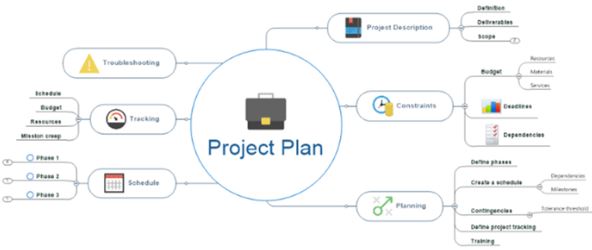
Erstellung von Mindmaps, Flowcharts & Konzeptdiagrammen
Projektplanung mit Gantt-Ansichten & Aufgabenmanagement
Integration mit Microsoft Office (Word, Excel, Outlook, PowerPoint)
Import & Export von Dateien (z. B. MS Project, Evernote, PDF u. v. m.)
Zusammenarbeit & Wissensmanagement leicht gemacht
Verbesserte Benutzeroberfläche für intuitive Bedienung
Ideal für Brainstorming, Meetings, Projektorganisation & Präsentationen
⚙️ System requirements:
Windows 7, 8, 10, 11 (32- & 64-Bit)
1 GHz oder schnellerer Prozessor
2 GB RAM (empfohlen: 4 GB oder mehr)
1 GB freier Festplattenspeicher
📦 Scope of delivery (digital)
✅ Download link (German & English)
✅ Offizieller Lizenzschlüssel für 3 PCs
✅ Installations- & Aktivierungsanleitung (PDF)
✨ Your advantages with us
⭐ Top-Preise – fair & günstig ⭐ German support - fast & competent help ⭐ 30-day refund - full satisfaction or money back ⭐ Lebenslange Lizenz – keine Folgekosten, kein Abo ⚡ Express-Lieferung – Key in Sekunden nach Zahlungseingang ⭐ Many payment methods - convenient & secure 🌱 Umweltfreundlich – digitale Lieferung statt Versand ⭐ 99% Customer satisfaction (Trustami verified)
Chinese, French, Japanese, Russian, German (German), English (English)
Shipping method:
3 seconds sending time, e-mail
Brand
Mindjet
Description
Go beyond the limits of what you can see, design, communicate and achieve.
The most powerful and flexible information visualization software, MindManager 2019 for Windows empowers you to uncover hidden opportunities, unite information and teams, and take off in productivity. So you can do great work faster than ever before.
NEW! Designs
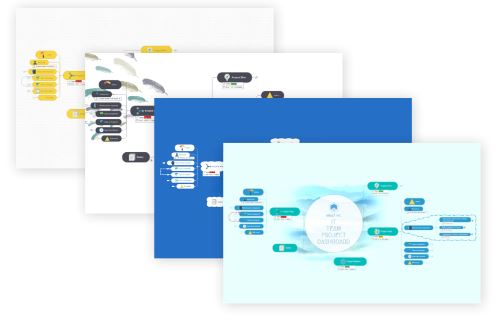
The first impression is crucial. Our new visual design options are characterized by fresh colors, modern fonts and individual designs. This allows you to incorporate your corporate design into your presentation and accentuate your branding, your products and your company content.
Choose from more than 40 attractive new designs, from classic to unconventional to formal, always tailored to your business
Change the appearance, impression and message of any map with just a few mouse clicks
Easily switch between designs to appeal to different target groups and support different objectives
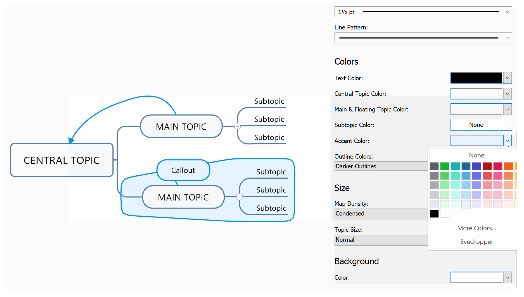
NEW! Intuitive design editors
Small visual details can have a big impact in communication. That's why we have grouped our editing tools for designs and templates into clear, user-friendly menus. With just a few clicks, you can customize the appearance of each map to convey the desired message.
Easily customize two-part texts in terms of fonts, lines, colors and much more
Switch to a different design without changing the structure of the map
Create thoroughly customized visualizations that reflect your branding, your content and your business vision
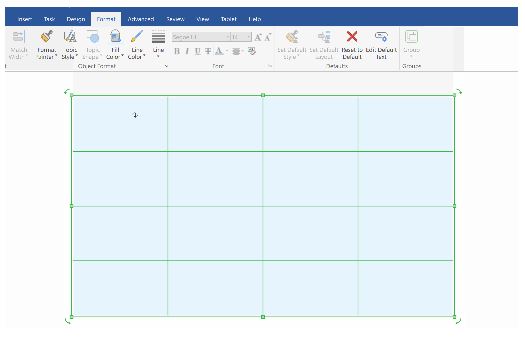
NEW! Objects & Smart Shapes
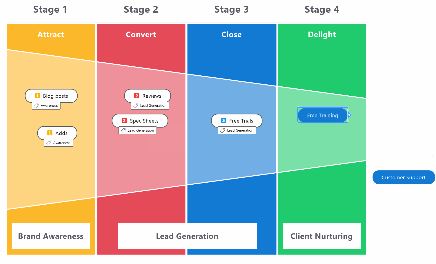
Shapes raise attention to a level that can never be achieved with words and facilitate understanding. That's why we've added 12 more meaningful shapes to our object library. You can group branches or process sections within shapes to emphasize different levels of importance, or combine configurable Smart Shapes to create new templates and diagram types that perfectly support your specific goals.
Supplement, clarify and expand map content with 12 new shapes, such as stars, arrows, brackets, funnels and many more
Use shapes to visually emphasize content groups, for example to define processes or illustrate concepts
Create your own diagrams quickly and easily with new Smart Shapes, e.g. with the new diagram types "Funnels" and "Matrices"
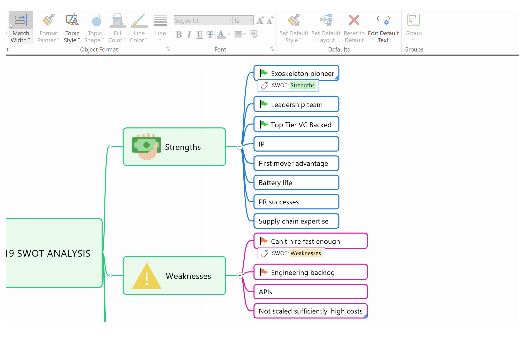
NEW! Define and match branch widths (Match Width)
Too much visual variety can distract people from what you want them to see. With the new branch customization tools, branches can be brought to a uniform width so that your audience immediately focuses on the content of your presentation and not on its structure.
Standardize branch sizes to make presentations easier to read and more appealing
Adjust the branch size manually or with a single mouse click
Apply changes to individual branches or entire maps
NEW! Filtering in HTML5 export & Publisher
Clear instructions ensure that everyone stays on the right path. Thanks to the new filtering and linking features we've integrated into our HTML5 export and publishing tools, recipients of your shared maps can find the information you want them to see faster and easier - making a huge difference to both communication and projects.
Make it easier to navigate, understand and respond to shared maps
Exported and published maps can be filtered by symbols, markers, resources and saved Power Filter queries
Visually guide recipients to the exact content you want to show with direct branch links
NEW! SmartRules™
Conditional formatting has already changed the spectrum that a map can express. Now another chapter is being opened. SmartRules™ extend the possibilities of conditional formatting and go far beyond them. They can automatically trigger changes to the actual branch data. This reduces repetitive tasks and maps are no longer just a simple representation of your processes and workflows, but also a means of controlling their content and, above all, speeding them up.
Write rules to change branch symbols, branch properties, tags, progress and priority markers based on specific triggers
Apply SmartRules to individual objects or branches, selected areas or entire diagrams
By automatically updating content in task lists, project plans and flowcharts, for example, you save time and increase your productivity
NEW! "Tag" view
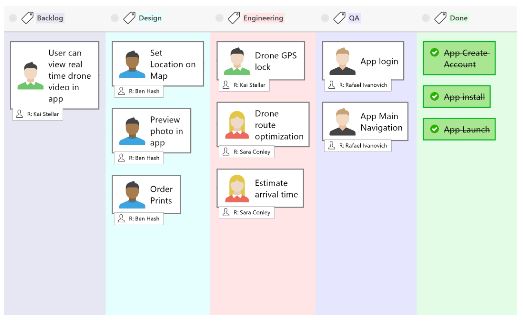
Projects are successful when they progress in a targeted manner. The "Tag" view provides a clear picture of the overall progress of the project and the status of individual tasks in the process. This allows you to make the necessary changes to ensure effective and timely project work.
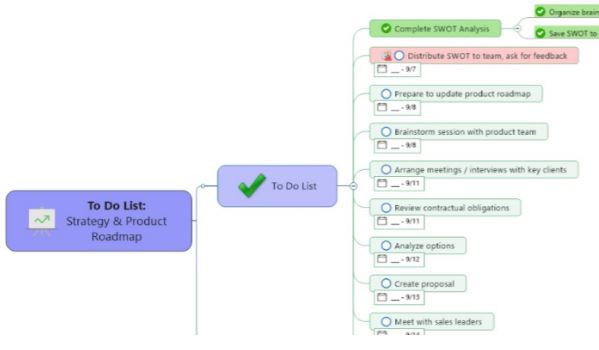
View and update the status of tasks and processing steps in a column view, in the style of a Kanban board
Recognize delays, bottlenecks and resource problems immediately
Define processes with custom column tags that are automatically applied in the map view
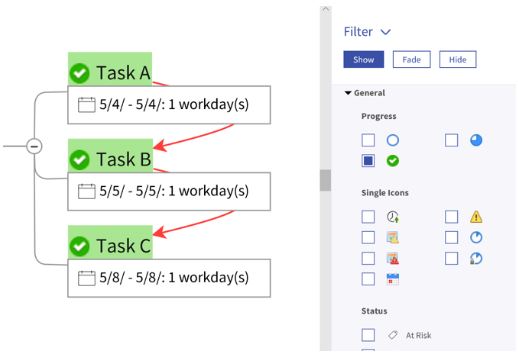
NEW! Symbol view
The right perspective can change everything. We've enhanced our popular priority view and added more than 500 icons. In addition, all views now have more flexible sorting and organizing options so you can see and display the information you need faster, at the exact moment you need it.
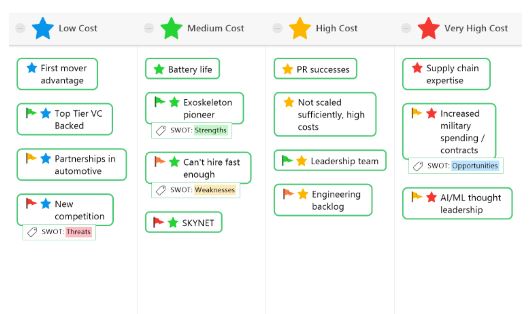
Display map content sorted according to the symbol used. Symbols are available in the categories priority, progress and over 500 others
Quickly assign symbols to branches in the symbol view, simply by drag & drop
Update and manage branches in all views faster, easier and more logically
New import function
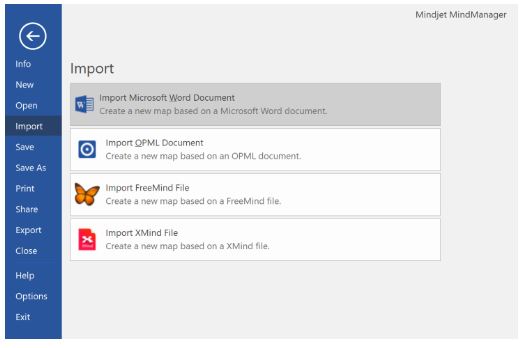
Under the right conditions, old ideas can reach new heights. Now you can take content created in XMind or FreeMind applications to a whole new level of depth, meaning and value with MindManager's best-in-class mapping and diagramming tools.
Convert XMind and FreeMind maps into the MindManager format and develop them further with the full range of MindManager functions
Import files directly into MindManager
Retain the structure and content of the map from the original applications without losing any data
PLUS:
Over 500 new and optimized symbols
Maximum information does not necessarily mean maximum space. Thanks to our expanded and improved symbol library, you can quickly add a large amount of visual information to branches, creating an efficient way of communicating that shows meaning at a glance and inspires action.
Optimized menu design
Having the right tools makes work easier and leads to better results. Our new menu design is cleaner, clearer and more user-friendly than ever before. You'll spend less time searching for content and more time innovating and creating.
Work as fast as you think.
With inflexible, linear tools, your best ideas fall by the wayside. Working with MindManager is modeled on the natural functioning principle of the brain - fast and dynamic - so that no idea or important detail is forgotten.
Quickly display more detailed levels for main points without losing the clarity and clear structure of relationships.
Add details and context while creating tasks without interrupting the workflow.
You can easily rearrange or copy information using drag & drop.
Don't be afraid of the details.
You can only be productive if you work on the right things. MindManager displays tasks, ideas, data and details in the appropriate context. You can see at a glance what is important, what needs to be prioritized and what can wait.
Discover hidden connections between topics, tasks and data.
Avoid redundancies, identify risks and recognize opportunities.
Identify the further effects of an action in advance in order to make informed decisions
Close communication gaps.
E-mail correspondence, unproductive meetings and a lack of coordination are deadly for projects. With MindManager, you can bring together all the information relating to a project, plan or concept in a central shared portal. Your team members can complete their tasks systematically and on time and - most importantly - are always on the same page.
Communicate responsibilities, priorities, deadlines and much more transparently.
Visually link related and interdependent action points to avoid redundancies and promote collaboration.
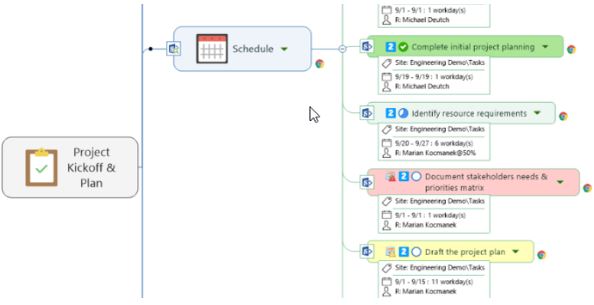
View projects by resources, tasks, schedule or in the Gantt view and keep track of the most important tasks, status, progress and risks.
Everything at a glance.
Knowledge is only power if you can access it. MindManager brings together distributed data in a single, clearly structured dashboard and presents it as a unified whole. In this way, all points are connected and taken into account, everything has a hand and foot and gets done.
Synchronize related data from Microsoft Office files, content repositories and over 800 apps.
You can easily add, relate and display files, images, links, media and much more. So you have your day and your work firmly under control.
Edit the displayed information flexibly and fluently without having to switch to another window or split the screen.
System requirements
MindManager 2019 for Windows
Supported operating systems:
Microsoft® Windows® 10 32-bit and 64-bit version
Microsoft® Windows® 8 and 8.1, 32-bit and 64-bit version
Microsoft® Windows® 7 Service Pack 1, 32-bit and 64-bit version
System requirements:
IBM or compatible Pentium® processor (at least 1 GHz)
at least 2 GB RAM
830 MB storage space on the hard disk
Recommended screen resolution: 1280 x 720 or higher
Microsoft .NET 4.6 or higher
Additional requirements for certain functions:
Microsoft Office Professional 2010, 2013, 2016 or 2019 (32-bit and 64-bit version)
Microsoft Project® 2010, 2013, 2016 or 2019 (32-bit and 64-bit version)
Microsoft Internet Explorer® 11.0 or higher
Broadband Internet connection
How is the delivery made?
Have you added your software to the shopping cart and completed the purchase of your product? Then the software you have purchased is available for you to download directly from our website. You will receive an e-mail from us with the corresponding product key and a link to download the software. Please note that an Internet connection is required to activate the product.
Legal matters
With the legally binding judgment of the Federal Court of Justice of 11.12.2014 with the file number: IZR 8/1 /3 we do not violate any rights of third parties with our offer & therefore do not violate any principles, the software is a single-user licensing from a volume contract takeover, a registration to an ID is therefore not possible. You can activate the product, use it without restriction and also obtain updates etc., but you cannot register it.
European legal situation
"A software manufacturer cannot oppose the resale of its 'used' licenses that enable the use of its programs downloaded from the Internet."
From the press release no. 94/12 on the judgment in case C-128/11 of the Court of Justice of the European Union (CJEU)
Information obligations of the seller before the sale of used software, according to OLG Hamburg, decision of June 16, 2016 - 5 W 36/16 Rn. 37 ff. = CR 2016, 642 ff.
Note: This view of the Higher Regional Court of Hamburg has not yet become the subject of supreme court rulings. Nevertheless, we adhere to it.
Accordingly, a seller of used software licenses must already inform potential buyers in his sales offer about:
the supply chain and authorization with regard to the used software offered or the license (we are able to do this. We also have the login to the Microsoft account where the licenses are stored)
the circumstances that led to the exhaustion of the distribution right of the used software under copyright law within the meaning of Section 69c No. 3 UrhG (by provable purchase of the license)
the fact that the seller and any previous owners of the software license have deleted their copies of the software or otherwise rendered them unusable (we can only act in good faith)
the right of the potential purchaser to use all updates and upgrades of the software that have been released since the initial purchase of the basic version.
(You will receive this automatically from Microsoft as long as it is made available)
Furthermore, we can assure you that;
The contractual software was acquired for an indefinite period and paid for in full.
No ancillary agreements have been made that affect the intended use of this software.
No third-party rights to the software exist, nor have the relevant licenses been transferred to another person or entity.
The software was placed on the market in the territory of the European Union or another state party to the Agreement on the European Economic Area by way of sale with the consent of the software vendor or was transferred in accordance with the contract to an affiliated company of the original purchaser in the territory of the EU or another state party to the Agreement on the European Economic Area European legal situation
"A software manufacturer cannot oppose the resale of its 'used' licenses that enable the use of its programs downloaded from the Internet."
From the press release no. 94/12 on the judgment in case C-128/11 of the Court of Justice of the European Union (CJEU)
Information obligations of the seller before the sale of used software, according to OLG Hamburg, decision of June 16, 2016 - 5 W 36/16 Rn. 37 ff. = CR 2016, 642 ff.
Note: This view of the Higher Regional Court of Hamburg has not yet become the subject of supreme court rulings. Nevertheless, we adhere to it.
Accordingly, a seller of used software licenses must already inform potential buyers in his sales offer about:
the supply chain and authorization with regard to the used software offered or the license (we are able to do this. We also have the login to the Microsoft account where the licenses are stored)
the circumstances that led to the exhaustion of the distribution right of the used software under copyright law within the meaning of Section 69c No. 3 UrhG (by provable purchase of the license)
the fact that the seller and any previous owners of the software license have deleted their copies of the software or otherwise rendered them unusable (we can only act in good faith)
the right of the potential purchaser to use all updates and upgrades of the software that have been released since the initial purchase of the basic version.
(You will receive this automatically from Microsoft as long as it is made available)
Furthermore, we can assure you that;
The contractual software was acquired for an indefinite period and paid for in full.
No ancillary agreements have been made that affect the intended use of this software.
No third-party rights to the software exist, nor have the relevant licenses been transferred to another person or entity.
The software was placed on the market in the territory of the European Union or another state party to the Agreement on the European Economic Area by way of sale with the consent of the software reseller or was transferred in accordance with the contract to an affiliated company of the original purchaser in the territory of the EU or another state party to the Agreement on the European Economic Area
How do our prices come about?
Through volume bundling
Elimination of delivery and storage fees through virtual merchandise management.
Direct imports
Long-term relationships with distributors.
Low profit margin, the main priority at eSoftkey.de is value creation and growing the customer base.
Centralized and lean administration.
Volume purchases from authorized suppliers/distributors.
No need for high-priced marketing investments, as we place more value on regular customers in the sense of "customers recommend customers", we realize cost advantages that we pass on to our customers through low prices.
Based on 0 reviews
0.0 overall
0
0
0
0
0
Only logged in customers who have purchased this product may leave a review.





 Microsoft Office 2024, Microsoft Office for Mac











There are no reviews yet.