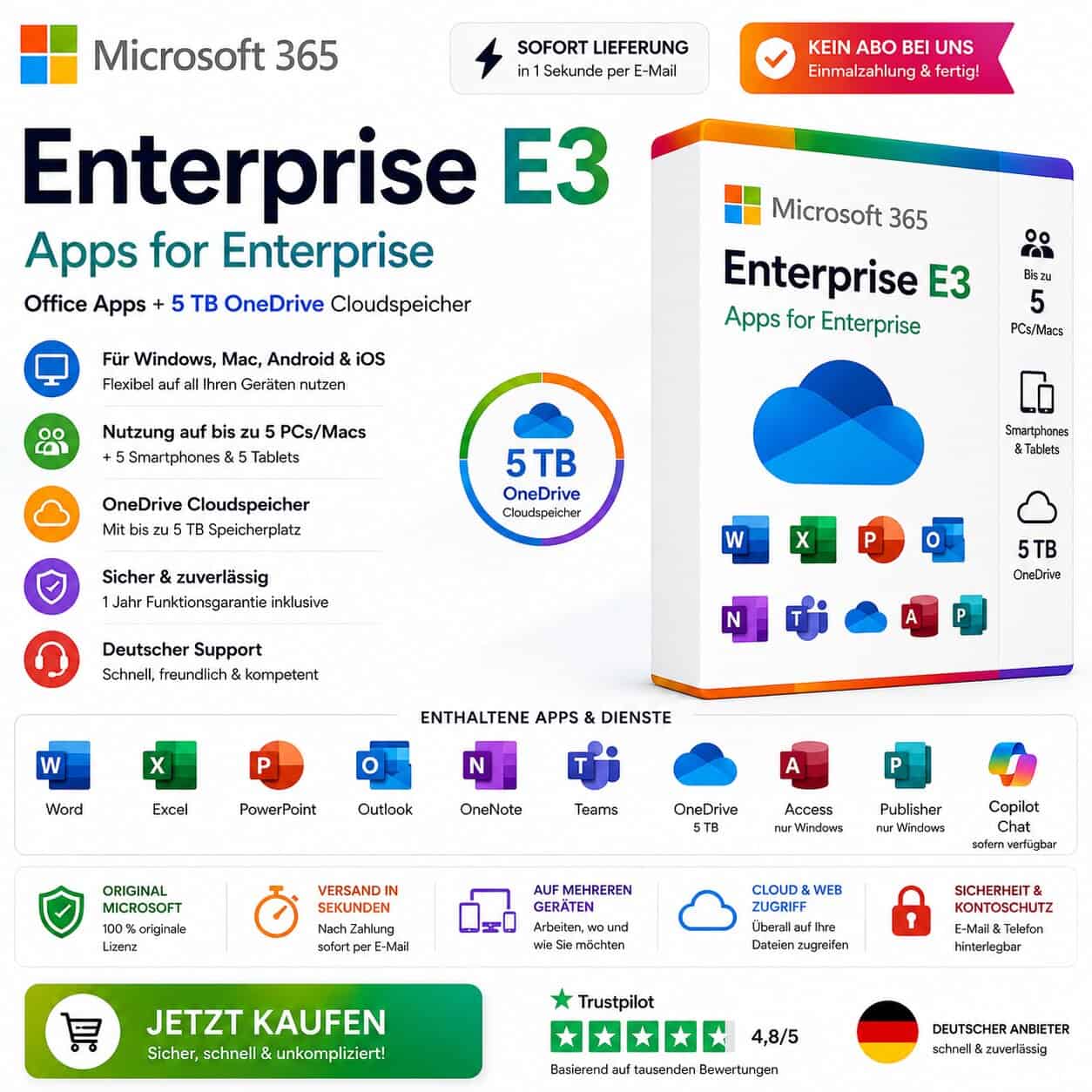
💻 Microsoft 365 Apps for Enterprise E3 – Windows/Mac/Android/iOS | Office + 5 TB OneDrive
📩 Digitale Lieferung in 1 Sekunde per E-Mail – schnell, sicher & bequem.
🔑 Aktivierung & Nutzung
Nutzung über bereitgestellten Microsoft-Konto-Zugang
✅ Einmalzahlung an uns – keine monatlichen oder jährlichen Zahlungen bei uns
✅ Kein klassischer Produktschlüssel – Nutzung erfolgt über Microsoft-Konto
✅ Für Windows, macOS, Android, iOS und iPadOS geeignet
✅ Nutzung auf bis zu 5 PCs oder Macs möglich
✅ Zusätzlich nutzbar auf Smartphones und Tablets
✅ Inklusive Microsoft Office Apps & OneDrive Cloudspeicher
✅ Eigene E-Mail-Adresse und Telefonnummer zur Kontowiederherstellung hinterlegbar
💾 Produktinformationen
Produkttyp: Digitaler Microsoft-Konto-Zugang
License type: Microsoft 365 Apps for Enterprise
Plan: Enterprise E3
Devices: Bis zu 5 PCs/Macs + Smartphones & Tablets
Cloudspeicher: OneDrive mit bis zu 5 TB
Verwendung: Privat, Homeoffice, Schule, Studium und allgemeine Büroarbeit
Garantie: 1 Jahr Funktionsgarantie auf den bereitgestellten Zugang
⚙️ Kompatibilität
✔️ Windows 11
✔️ Windows 10
✔️ macOS
✔️ Android
✔️ iPhone / iOS
✔️ iPad / iPadOS
✔️ Nutzung auch über den Webbrowser möglich
⚠️ Note: Access und Publisher sind nur für Windows verfügbar und nicht für macOS erhältlich.
📦 Lieferumfang digital
✅ Login-Daten zum Microsoft-Konto
✅ Passwort zum Konto
✅ Microsoft 365 Apps for Enterprise E3-Zugang
✅ OneDrive-Cloudspeicher mit bis zu 5 TB
✅ Installations- & Einrichtungsanleitung
✅ Anleitung zur Nutzung von Office und OneDrive
✅ Hinweise zur Kontowiederherstellung per E-Mail-Adresse und Telefonnummer
✅ Kostenloser technischer Support bei Fragen
🌟 Ihre Vorteile bei uns
⭐ Sehr günstig & faire Preise gegenüber anderen Anbietern
⭐ Einmalzahlung an uns – keine Aboverpflichtung bei uns
⭐ Deutscher Support – schnell & kompetent
⭐ 1 Jahr Funktionsgarantie auf den bereitgestellten Zugang
⭐ Nutzung auf mehreren Geräten möglich
⚡ Versand in Sekunden nach Zahlungseingang
☁️ Bis zu 5 TB OneDrive-Cloudspeicher inklusive
🌱 Umweltfreundlich – keine Verpackung, kein Transport
🇩🇪 Deutscher Anbieter & schneller E-Mail-Support
📑 Enthaltene Programme & Dienste
📄 Word – Textverarbeitung & Dokumente
📊 Excel – Tabellen, Formeln & Auswertungen
📽️ PowerPoint – Präsentationen & Designs
📧 Outlook – E-Mails, Kalender & Kontakte
📒 OneNote – Digitales Notizbuch
💬 Teams – Kommunikation & Meetings
☁️ OneDrive – Cloudspeicher für Dateien, Fotos und Videos
🗂️ Access – Datenbanken & Tools, nur Windows
📰 Publisher – Layouts & Designs, nur Windows
🤖 Microsoft Copilot Chat – sofern im Konto verfügbar
🌐 Weitere Microsoft-365-Web-Apps und Funktionen je nach Konto
☁️ OneDrive Cloudspeicher
Mit dem enthaltenen OneDrive-Speicher können Sie Dateien, Dokumente, Fotos und Videos online speichern, synchronisieren und auf mehreren Geräten abrufen.
✅ Dateien online sichern
✅ Dokumente zwischen Geräten synchronisieren
✅ Ordner und Dateien per Link teilen
✅ Zugriff über PC, Mac, Smartphone, Tablet oder Browser
✅ Automatischer Upload von Fotos und Videos möglich
🔐 Kontosicherheit
Sie können Ihre eigene E-Mail-Adresse und Mobiltelefonnummer zur Kontowiederherstellung hinterlegen. Dadurch können Sie bei Bedarf das Passwort zurücksetzen und den Zugriff besser absichern.
💬 Kundensupport
Bei Fragen oder Problemen helfen wir Ihnen jederzeit weiter:
📩 E-Mail-Support: support@esoftkey.de
💬 Persönliche Hilfe bei Anmeldung, Installation und Einrichtung
Schnell, zuverlässig & unkompliziert.
ℹ️ Wichtiger Hinweis
Sie erhalten einen digitalen Zugang zu einem Microsoft-Konto mit aktivem Microsoft 365 Apps for Enterprise E3-Plan. Es handelt sich nicht um einen klassischen Produktschlüssel und nicht um eine physische Ware.
Sie erhalten 1 Jahr Funktionsgarantie auf den bereitgestellten Microsoft-365-Zugang. Änderungen an Microsoft-Diensten, Speicherlimits, OneDrive-Funktionen oder Planbestandteilen können durch Microsoft erfolgen und liegen außerhalb unseres Einflussbereichs.
Microsoft, Microsoft 365, Office, Word, Excel, PowerPoint, Outlook, OneDrive, Teams, Access, Publisher und weitere genannte Produktnamen sind Marken der Microsoft Corporation. Die Nennung dient ausschließlich der eindeutigen Produktbeschreibung.
German (German), English (English), Other languages ONLY on request
Shipping method:
3 seconds sending time, e-mail
Brand
Microsoft
Description
Produktbeschreibung „Microsoft 365 Apps for Enterprise E3“
⭐ Microsoft 365 Enterprise E3 kaufen – Office für Windows, Mac, Android & iOS | 5 TB OneDrive | Sofortzugang
Microsoft 365 Apps for Enterprise E3 ist eine moderne Office-Lösung für Nutzer, die Word, Excel, PowerPoint, Outlook, Teams, OneDrive und weitere Microsoft-Apps flexibel auf mehreren Geräten nutzen möchten.
Mit diesem Microsoft-365-Zugang erhalten Sie Zugriff auf die bekannten Office-Programme sowie auf OneDrive-Cloudspeicher mit bis zu 5 TB. Die Nutzung erfolgt bequem über ein bereitgestelltes Microsoft-Konto mit aktivem Enterprise-E3-Plan.
Ideal für Privatnutzer, Homeoffice, Schule, Studium, Büroarbeit und produktives Arbeiten auf Windows, Mac, Smartphone und Tablet.
🔥 Warum Microsoft 365 Enterprise E3?
Microsoft 365 bietet eine moderne, flexible Office-Umgebung mit regelmäßigen Updates und Cloud-Funktionen.
Ihre Vorteile:
Nutzung auf Windows, macOS, Android, iOS und iPadOS
Office-Apps als Desktop-, Web- und Mobile-Version
Zugriff auf Word, Excel, PowerPoint, Outlook, OneNote, Teams und OneDrive
OneDrive-Cloudspeicher mit bis zu 5 TB
Regelmäßige Microsoft-Updates
Anmeldung und Aktivierung über Microsoft-Konto
Ideal für mehrere Geräte
Kein klassischer Produktschlüssel erforderlich
Sie erhalten keinen normalen Office-Key, sondern Zugangsdaten zu einem Microsoft-Konto mit aktivem Microsoft-365-Plan.
📦 Enthaltene Programme & Dienste
📄 Microsoft Word
Professionelle Textverarbeitung für:
Briefe
Dokumente
Verträge
Hausarbeiten
Bewerbungen
geschäftliche Unterlagen
Mit Word erstellen und bearbeiten Sie Dokumente lokal auf dem Gerät oder direkt im Browser.
📊 Microsoft Excel
Leistungsstarke Tabellenkalkulation für:
Tabellen
Formeln
Diagramme
Buchhaltung
Auswertungen
Finanzen
Datenanalyse
Excel eignet sich ideal für private, schulische und berufliche Aufgaben.
📽️ Microsoft PowerPoint
Erstellen Sie professionelle Präsentationen für:
Schule & Studium
Meetings
Unternehmen
Projekte
Vorträge
Marketing
Mit modernen Designs, Übergängen und Vorlagen gestalten Sie Präsentationen schnell und übersichtlich.
📧 Microsoft Outlook
Professionelles E-Mail- und Kalendermanagement:
E-Mails verwalten
Kalender nutzen
Kontakte organisieren
Termine planen
mehrere Konten verbinden
Ideal für Büro, Homeoffice und private Organisation.
📒 Microsoft OneNote
Ihr digitales Notizbuch für:
Notizen
Ideen
Checklisten
Unterricht
Studium
Projektplanung
Alle Notizen können bequem organisiert und geräteübergreifend genutzt werden.
💬 Microsoft Teams
Kommunikation und Zusammenarbeit:
Chats
Online-Meetings
Videokonferenzen
Teamarbeit
Datei-Austausch
Ideal für Schule, Arbeit, Projekte und digitale Zusammenarbeit.
☁️ Microsoft OneDrive
OneDrive bietet Cloudspeicher für Ihre Dateien, Fotos, Videos und Dokumente.
Vorteile:
Dateien online speichern
Dokumente zwischen Geräten synchronisieren
Dateien und Ordner per Link teilen
Zugriff über PC, Mac, Smartphone, Tablet oder Browser
Cloudspeicher mit bis zu 5 TB, je nach Kontostatus und Verfügbarkeit
🗂️ Microsoft Access
Datenbank-Software für Windows:
Datenbanken erstellen
Daten verwalten
Formulare nutzen
Berichte erstellen
Hinweis: Access ist nur für Windows verfügbar.
📰 Microsoft Publisher
Layout- und Designprogramm für Windows:
Flyer
Broschüren
Karten
Einladungen
einfache Marketingmaterialien
Hinweis: Publisher ist nur für Windows verfügbar.
✔️ Vorteile Ihres Microsoft-365-Zugangs
Zugriff auf Microsoft 365 Apps for Enterprise
Nutzung auf bis zu 5 PCs oder Macs
Zusätzlich nutzbar auf Tablets und Smartphones
Office-Apps für Windows, macOS, Android, iOS und iPadOS
OneDrive-Cloudspeicher mit bis zu 5 TB
Web-Versionen der Office-Apps nutzbar
Desktop-Apps für Windows und Mac verfügbar
Keine monatlichen Zahlungen an uns
Digitale Lieferung per E-Mail
Schnelle Einrichtung
Deutscher Support durch eSoftkey.de
1 Jahr Funktionsgarantie auf den bereitgestellten Zugang
🚀 Was ist der Unterschied zu Office 2021?
Microsoft Office 2021 ist eine klassische Dauerlizenz für einen PC oder Mac.
Microsoft 365 Enterprise E3 ist dagegen ein moderner Konto-Zugang mit Cloud-Funktionen und regelmäßigen Updates.
Microsoft 365 bietet zusätzlich:
Nutzung auf mehreren Gerätetypen
Cloudspeicher über OneDrive
Web-Apps im Browser
Mobile Apps für Smartphone und Tablet
regelmäßige Funktions- und Sicherheitsupdates
einfache Anmeldung über Microsoft-Konto
💼 Für wen eignet sich Microsoft 365 Enterprise E3?
Dieser Microsoft-365-Zugang eignet sich ideal für:
Privatnutzer
Homeoffice
Schüler
Studenten
Büroarbeit
Selbstständige
Familiengeräte
Nutzer mit Windows-PC und Mac
Nutzer mit Smartphone und Tablet
Personen, die Cloudspeicher benötigen
Besonders praktisch ist Microsoft 365, wenn Sie Office auf mehreren Geräten nutzen und Ihre Dokumente online speichern oder synchronisieren möchten.
🔑 Aktivierung & Anmeldung
Die Aktivierung erfolgt nicht über einen klassischen Produktschlüssel.
Sie erhalten nach dem Kauf:
Login-Daten zum Microsoft-Konto
Passwort zum Konto
Anleitung zur Installation
Hinweise zur Kontosicherheit
Support bei Fragen
Nach der Installation öffnen Sie einfach Word, Excel oder eine andere Microsoft-365-App und melden sich mit den erhaltenen Zugangsdaten an.
Danach wird Microsoft 365 automatisch aktiviert.
☁️ OneDrive Cloudspeicher
Mit OneDrive können Sie Ihre Dateien sicher online speichern und auf mehreren Geräten nutzen.
Sie können zum Beispiel:
Dokumente sichern
Fotos und Videos speichern
Dateien zwischen Geräten synchronisieren
Ordner per Link teilen
Dateien unterwegs abrufen
Der verfügbare OneDrive-Speicher kann nach dem Login im Konto geprüft werden.
🖥️ Kompatibilität
Microsoft 365 ist kompatibel mit:
Windows 11
Windows 10
macOS
Android
iPhone / iOS
iPad / iPadOS
Webbrowser
Hinweis: Access und Publisher sind nur für Windows verfügbar.
📦 Lieferumfang
Nach dem Kauf erhalten Sie digital per E-Mail:
Microsoft-Konto-Zugangsdaten
Passwort zum Konto
Microsoft 365 Apps for Enterprise E3-Zugang
Installationsanleitung
Anleitung zur Anmeldung und Aktivierung
Hinweise zur Passwortänderung
Hinweise zur Einrichtung von E-Mail/Telefonnummer zur Kontowiederherstellung
Kostenlosen technischen Support bei Fragen
🔐 Kontosicherheit
Wir empfehlen nach dem ersten Login:
Passwort ändern
eigene E-Mail-Adresse hinterlegen
Telefonnummer zur Wiederherstellung hinzufügen
Zwei-Faktor-Authentifizierung aktivieren
So können Sie Ihr Konto besser schützen und bei Bedarf wiederherstellen.
💬 Sie benötigen Hilfe bei Installation oder Anmeldung?
Unser Support-Team von eSoftkey.de hilft Ihnen gerne weiter.
Starten Sie direkt nach dem Kauf mit Word, Excel, PowerPoint, Outlook, Teams und OneDrive.
Profitieren Sie von moderner Office-Nutzung, Cloudspeicher, regelmäßigen Updates und flexibler Nutzung auf mehreren Geräten.
Digitale Lieferung – schnell, einfach und bequem.
What does the Office package include?
📦 Was beinhaltet das Paket?
Nach dem Kauf erhalten Sie digital per E-Mail:
✅ Zugangsdaten zu einem Microsoft-Konto ✅ Passwort zum Microsoft-Konto ✅ Aktiver Microsoft 365 Apps for Enterprise E3-Zugang ✅ Nutzung der Office-Apps nach Anmeldung mit dem Konto ✅ Downloadmöglichkeit für Windows und macOS ✅ Nutzung über Webbrowser möglich ✅ Nutzung auf Smartphone und Tablet möglich ✅ OneDrive-Cloudspeicher mit bis zu 5 TB ✅ Installations- & Einrichtungsanleitung ✅ Hinweise zur Passwortänderung ✅ Hinweise zur Einrichtung von E-Mail/Telefonnummer zur Kontowiederherstellung ✅ Kostenloser technischer Support bei Fragen
Enthaltene Programme & Dienste:
📄 Microsoft Word 📊 Microsoft Excel 📽️ Microsoft PowerPoint 📧 Microsoft Outlook 📒 Microsoft OneNote 💬 Microsoft Teams ☁️ Microsoft OneDrive 🗂️ Microsoft Access, nur Windows 📰 Microsoft Publisher, nur Windows 🤖 Microsoft Copilot Chat, sofern im Konto verfügbar 🌐 Weitere Microsoft-365-Web-Apps und Funktionen je nach Konto
How is the delivery made?
Have you added your software to the shopping cart and completed the purchase of your product? Then the software you have purchased is available for you to download directly from our website. You will receive an e-mail from us with the corresponding product key and a link to download the software. Please note that an Internet connection is required to activate the product.
Legal matters
With the legally binding judgment of the Federal Court of Justice of 11.12.2014 with the file number: IZR 8/1 /3 we do not violate any rights of third parties with our offer & therefore do not violate any principles, the software is a single-user licensing from a volume contract takeover, a registration to an ID is therefore not possible. You can activate the product, use it without restriction and also obtain updates etc., but you cannot register it.
European legal situation
"A software manufacturer cannot oppose the resale of its 'used' licenses that enable the use of its programs downloaded from the Internet."
From the press release no. 94/12 on the judgment in case C-128/11 of the Court of Justice of the European Union (CJEU)
Information obligations of the seller before the sale of used software, according to OLG Hamburg, decision of June 16, 2016 - 5 W 36/16 Rn. 37 ff. = CR 2016, 642 ff.
Note: This view of the Higher Regional Court of Hamburg has not yet become the subject of supreme court rulings. Nevertheless, we adhere to it.
Accordingly, a seller of used software licenses must already inform potential buyers in his sales offer about:
the supply chain and authorization with regard to the used software offered or the license (we are able to do this. We also have the login to the Microsoft account where the licenses are stored)
the circumstances that led to the exhaustion of the distribution right of the used software under copyright law within the meaning of Section 69c No. 3 UrhG (by provable purchase of the license)
the fact that the seller and any previous owners of the software license have deleted their copies of the software or otherwise rendered them unusable (we can only act in good faith)
the right of the potential purchaser to use all updates and upgrades of the software that have been released since the initial purchase of the basic version.
(You will receive this automatically from Microsoft as long as it is made available)
Furthermore, we can assure you that;
The contractual software was acquired for an indefinite period and paid for in full.
No ancillary agreements have been made that affect the intended use of this software.
No third-party rights to the software exist, nor have the relevant licenses been transferred to another person or entity.
The software was placed on the market in the territory of the European Union or another state party to the Agreement on the European Economic Area by way of sale with the consent of the software reseller or was transferred in accordance with the contract to an affiliated company of the original purchaser in the territory of the EU or another state party to the Agreement on the European Economic AreaEuropean legal situation
"A software manufacturer cannot oppose the resale of its 'used' licenses that enable the use of its programs downloaded from the Internet."
From the press release no. 94/12 on the judgment in case C-128/11 of the Court of Justice of the European Union (CJEU)
Information obligations of the seller before the sale of used software, according to OLG Hamburg, decision of June 16, 2016 - 5 W 36/16 Rn. 37 ff. = CR 2016, 642 ff.
Note: This view of the Higher Regional Court of Hamburg has not yet become the subject of supreme court rulings. Nevertheless, we adhere to it.
Accordingly, a seller of used software licenses must already inform potential buyers in his sales offer about:
the supply chain and authorization with regard to the used software offered or the license (we are able to do this. We also have the login to the Microsoft account where the licenses are stored)
the circumstances that led to the exhaustion of the distribution right of the used software under copyright law within the meaning of Section 69c No. 3 UrhG (by provable purchase of the license)
the fact that the seller and any previous owners of the software license have deleted their copies of the software or otherwise rendered them unusable (we can only act in good faith)
the right of the potential purchaser to use all updates and upgrades of the software that have been released since the initial purchase of the basic version.
(You will receive this automatically from Microsoft as long as it is made available)
Furthermore, we can assure you that;
The contractual software was acquired for an indefinite period and paid for in full.
No ancillary agreements have been made that affect the intended use of this software.
No third-party rights to the software exist, nor have the relevant licenses been transferred to another person or entity.
The software was placed on the market in the territory of the European Union or another state party to the Agreement on the European Economic Area by way of sale with the consent of the software reseller or was transferred in accordance with the contract to an affiliated company of the original purchaser in the territory of the EU or another state party to the Agreement on the European Economic Area
How do our prices come about?
Through volume bundling
Elimination of delivery and storage fees through virtual merchandise management.
Direct imports
Long-term relationships with distributors.
Low profit margin, the main priority at eSoftkey.de is value creation and growing the customer base.
Centralized and lean administration.
Volume purchases from authorized suppliers/distributors.
No need for high-priced marketing investments, as we place more value on regular customers in the sense of "customers recommend customers", we realize cost advantages that we pass on to our customers through low prices.
Based on 0 reviews
0.0 overall
0
0
0
0
0
Only logged in customers who have purchased this product may leave a review.





 For Windows, Nuance











There are no reviews yet.